Install plugins and mods
Search Modrinth or CurseForge from inside Mineshire, install with a click and keep add-ons up to date.

Forget hunting for jar files. Mineshire searches Modrinth and CurseForge for you and drops the file where the server expects it.
Install one
- Open the server's Plugins or Mods tab. The name depends on the server software.
- Press Browse to search. Results are filtered to your server's software and Minecraft version.
- Open a project to read about it, or press Install.
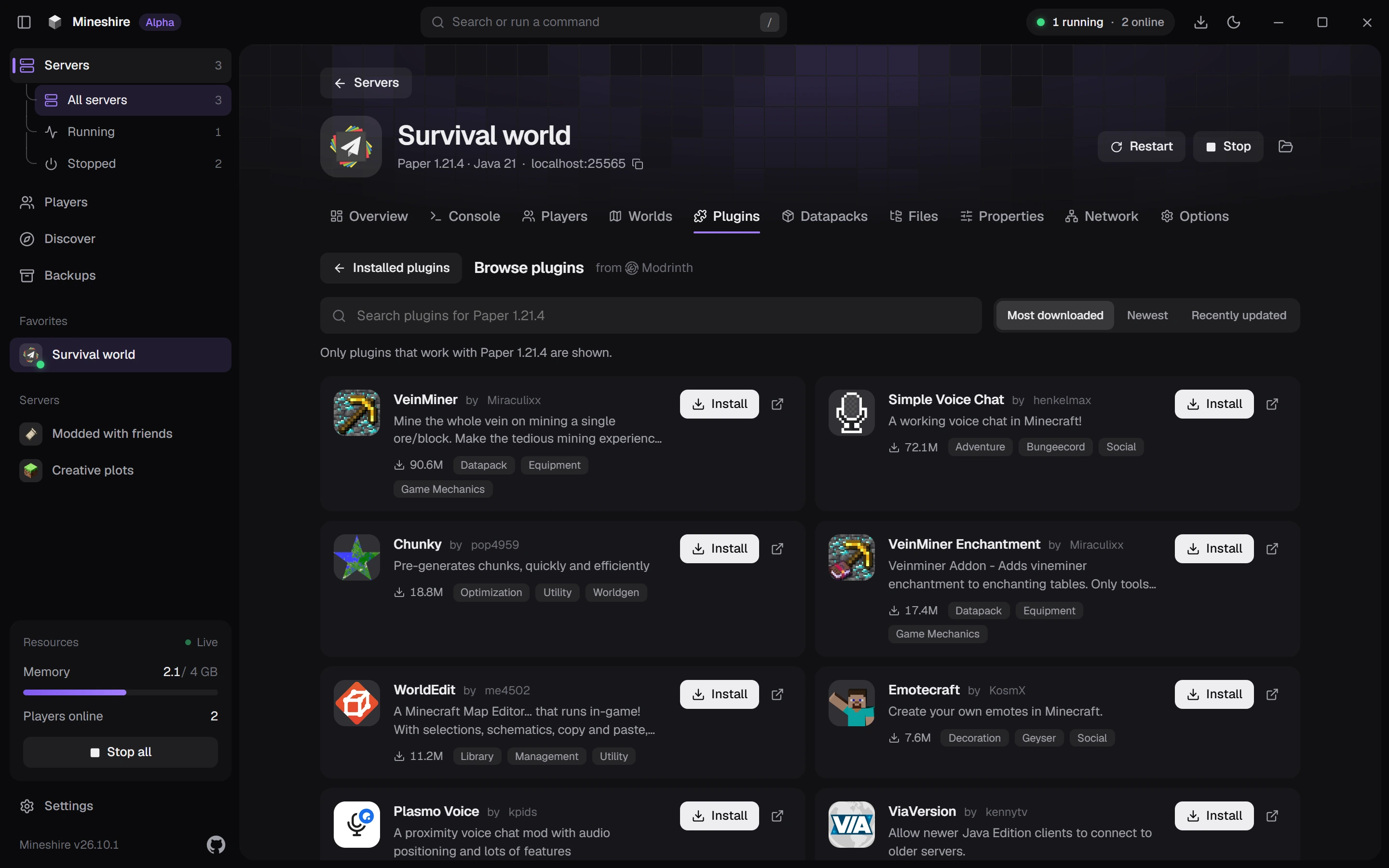
Whatever the add-on needs comes along with it, and you don't have to stop the server to install.
What's installed
The tab opens on Installed. Each row shows the icon, name and version, and whether an update is out. Files you dropped in by hand are recognised too, since Mineshire matches them against Modrinth.
- Update and Remove need the server stopped, because Windows locks a running jar.
- A badge on the tab counts the updates waiting, and Mineshire checks again every 30 minutes.
Switch to another version
Open a project and its page lists the compatible versions. Switch to this swaps your jar for that version.
Before you change Minecraft's version
Mineshire checks your add-ons ahead of a version change and tells you which ones have a version for the new Minecraft. See Change a server's Minecraft version.
Still stuck?
The Discord is the quickest way to reach us.