Back up and restore a server
Make a backup by hand, put one back, and keep a copy off your computer.

A backup is a copy you keep so you can go back. Mineshire has a Backups page just for them.
Make a backup
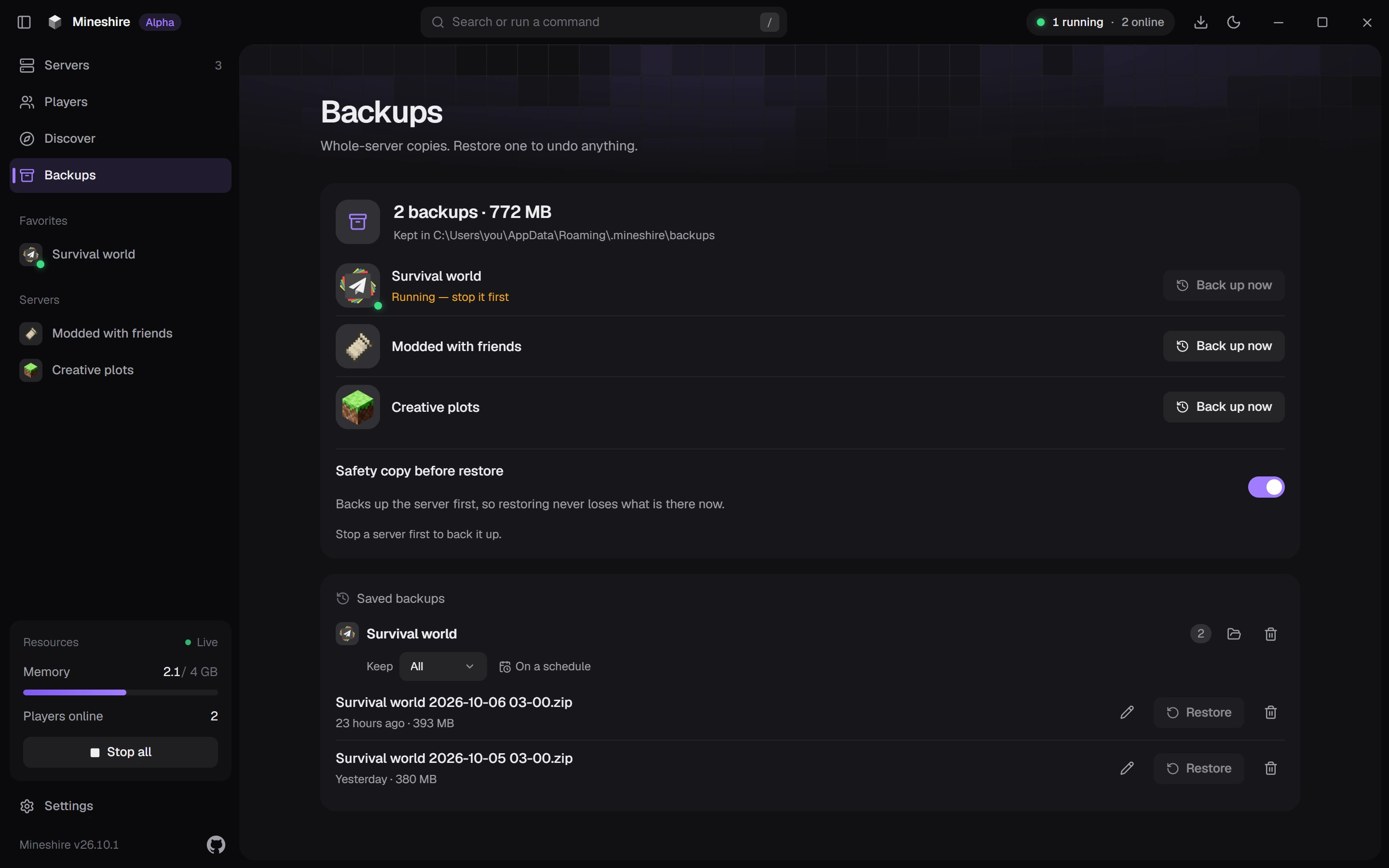
Open the Backups page and press Back up now next to the server. A progress bar shows while it works. Stop the server first, because files still being written can end up half saved.
Restore one
Press Restore on the backup you want. A restore only rewrites the files that differ from the backup, and it undoes itself if something fails.
The Safety copy before restore switch takes a copy of the current server first, so you can return to where you were. Leave it on unless you're short on space.
Keep a copy somewhere else
Backups live on your computer, and you can copy them to your Google Drive as well. Each backup row says where it is: on this computer, in Google Drive, or both. If you need the space, remove a backup from the computer and keep the Drive copy.
Do keep at least one copy somewhere other than the PC that runs the server. When a drive dies, the server and its local backups go down together.
Test a restore once
Do it while nothing is wrong. Restore a backup, start the server and walk around in it. A backup you've never opened is only a hope.
Old backups pile up too, and a world only grows, so thirty full copies can eat a whole disk. The last week or two of daily backups plus a few older ones is plenty for most servers.
If you ever copy by hand
Back up the whole server folder, not only the world. The world is a folder called world unless you changed level-name. On Spigot and Paper the Nether and the End sit in their own folders, usually world_nether and world_the_end. The plugins folder holds your permissions, shops and homes, a modded server needs its mods and config folders, and server.properties, whitelist.json and ops.json are worth keeping too. Copying everything takes more space, but you never find out later that you skipped the one file that mattered.
Copy a world while the server is writing to it and you can end up with a backup that looks fine, then refuses to load. Can't stop the server? Run save-off, then save-all flush, copy the folder, and finish with save-on. Don't forget that last one, because leaving saving off is how people lose a day of progress.
Backups, exports and duplicates
They all copy files, which is why people mix them up. A backup lives in Mineshire and lets you go back. An export packs the server into a zip you can move around, and a duplicate makes a second server to experiment on. New world, Duplicate, Export and Repair spells out the differences.
Want backups to happen on their own? See Back up on a schedule.
Still stuck?
The Discord is the quickest way to reach us.